Stream health on your recap
Recaps · 5 min read ·
With the Roadie OBS plugin, every recap has a stream health card beside it. It shows dropped frames, bitrate and crashes, and links each problem to the moment in your VOD.
When you stream with the Roadie OBS plugin, Roadie keeps track of how the stream ran. Your recap then has a Stream health card beside it. On a phone it comes after the recap. The chip at the top of the recap, such as Stream health · clean, jumps to it.
The card has a small timeline of your bitrate across the night and three rows: Dropped frames, Bitrate and Crashes. A green row means that part of the stream was fine. A red row tells you what happened and when. Select the time to open your VOD at that moment and see what your viewers saw.
Red marks on the timeline show the same problems: a red line where one started, and a red band for how long it lasted.
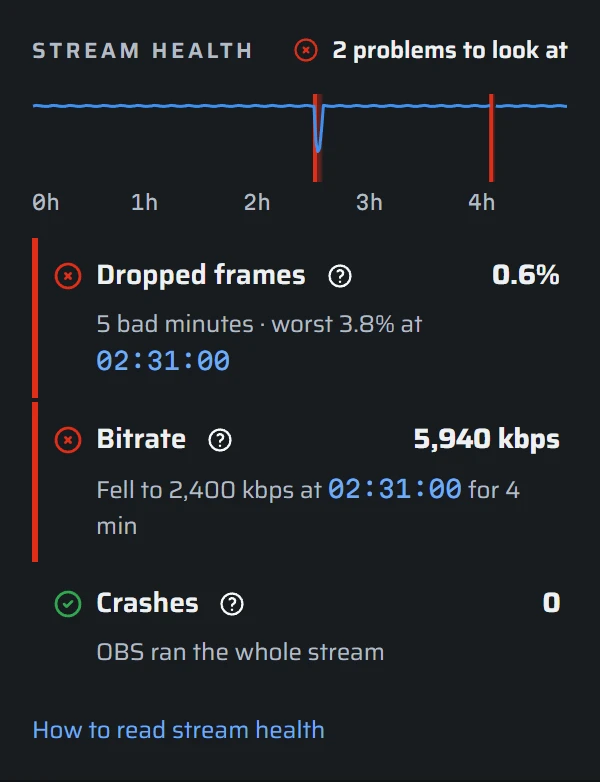
Every number on the card comes from OBS, through the plugin. Nothing on it is written by AI. You and your mods can see it. It is never part of the Discord post your recap drafts.
Dropped frames
Dropped frames are frames OBS made but could not send to Twitch in time, so your viewers never got them. They see a stutter or a freeze.
The row shows the share of frames dropped across the whole stream. It turns red when a minute lost more than 1% of its frames, or when OBS lost its connection to Twitch and had to reconnect. Problem minutes close together count as one stretch.
Dropped frames almost always come from your internet upload. To fix them:
- Use a wired connection instead of Wi-Fi.
- Lower your bitrate in OBS under Settings › Output.
- Check what else is uploading while you stream, such as cloud backups, game updates, or someone else on your network.
- If drops only happen sometimes, run a speed test while you stream to see whether your upload changes during the night.
Bitrate
Bitrate is how much video data you send each second, in kilobits per second (kbps). The row shows your average for the night, and the timeline shows it minute by minute.
The row turns red when your bitrate fell below 70% of its usual level for 2 minutes or more. That means your upload could not keep up with the rate OBS was set to.
- A drop with no dropped frames usually means OBS lowered your bitrate on purpose to protect the stream. OBS does this when Dynamically change bitrate to manage congestion is on, under Settings › Advanced. Viewers saw a softer picture, but no freezes.
- A drop with dropped frames means your upload struggled. The fixes for dropped frames above apply.
- 2 tracks (Enhanced Broadcasting) means you stream with Twitch Enhanced Broadcasting, which sends more than one version of your stream. The bitrate on the card counts all of them together, so it can be higher than the rate you would set for one version.
- A gap in the line means the plugin was not reporting then, for example while the Signal dock was closed.
Crashes
The row counts OBS crashes during your stream, or within 10 minutes after it ended. A crash shows as a red line on the timeline.
If Send crash reports to Roadie is on, the plugin sends OBS's own crash report to Roadie the next time OBS starts, and we look into it. You do not need to send anything. Paths with your Windows user name in them are removed first. You can turn crash reports off on the OBS connector page.
If OBS crashes again:
- Update OBS and your OBS plugins, including the Roadie plugin.
- If the crashes started after you added a plugin, remove it and stream once without it.
When there is no stream health card
The card only appears when the plugin reported on the stream. If your recap has no card:
- The plugin is not installed. See Install the OBS Signal plugin.
- Share OBS state with Roadie is off. Turn it on in the Signal dock's gear. Stream health uses the same switch as your scene and live status.
- The Signal dock was closed, or OBS was not running the plugin, for most of the stream. The plugin needs at least 5 minutes of the stream to say anything.
If the plugin reported only part of the stream, the card says so. A problem outside that time would not show.