Control Roadie from a Stream Deck
Automation · 6 min read ·
Put Roadie's live controls on Stream Deck keys, like pause clips, skip TTS, next song or close a poll. You need one API token and a web-request plugin from the Elgato Marketplace.
Roadie has a short list of live controls that anything outside the dashboard can press: pause and resume clips, skip or stop a clip, hold or skip TTS, play, pause or skip a song, close or open a poll, open, close or draw a giveaway, fire a timer, switch the Stage view, and switch OBS scenes. A Stream Deck key can press any of them, so you never have to open the dashboard mid-stream.
There is no Roadie plugin for the Stream Deck yet. Until there is, a key calls Roadie the same way Firebot or Streamer.bot does: it sends a web request with your API token in a header. A plugin from the Elgato Marketplace does that for you.
The Stream Deck's built-in Website action can't do this. It opens the address in a browser, which can't send your token, so Roadie answers
401and nothing happens.
What you need
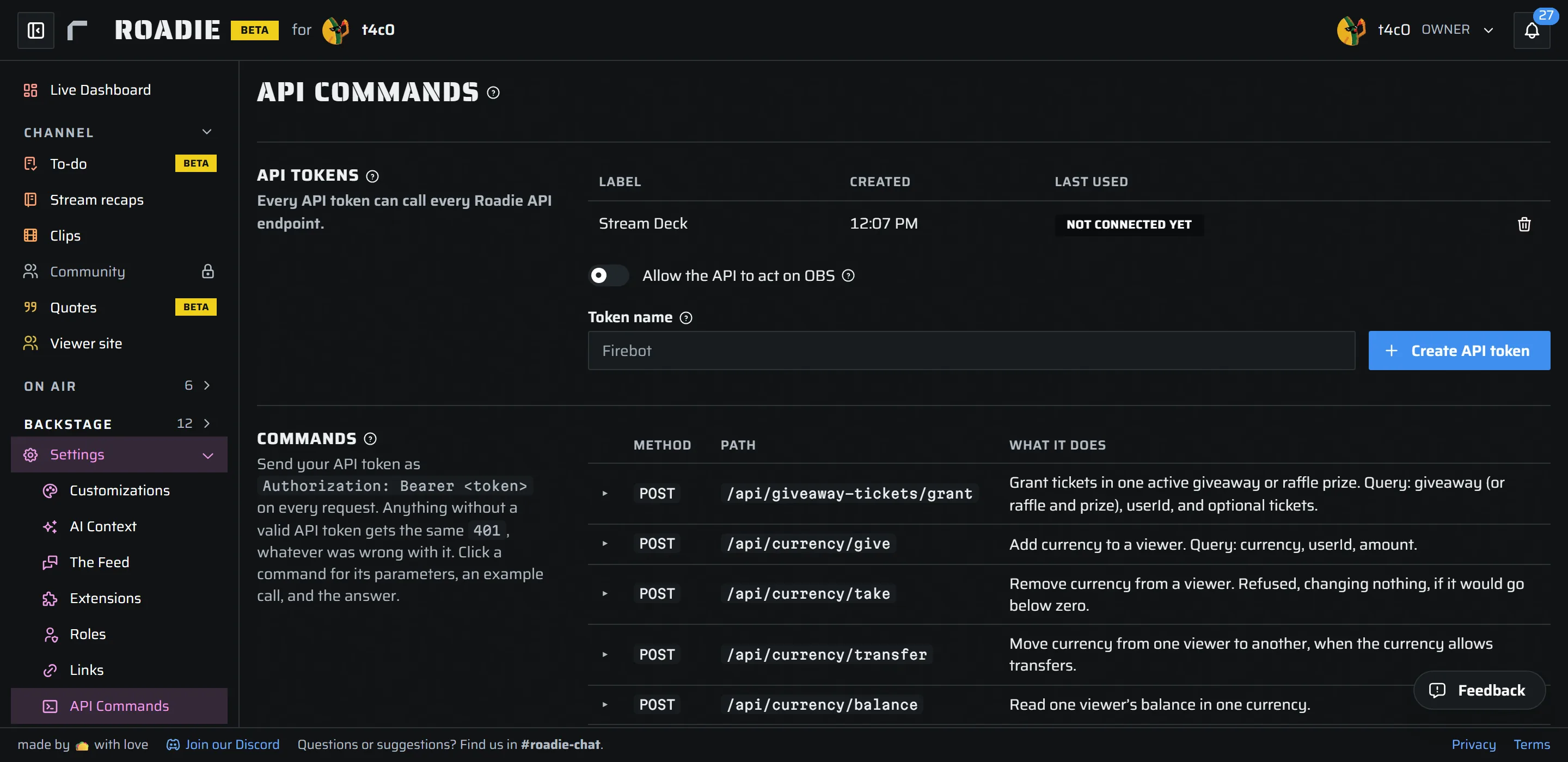
- An API token. Only the channel owner can make one. Open Settings › API Commands, type a Token name such as
Stream Deck, and press Create API token. Copy it right away: Roadie shows it only once. If you lose it, revoke it and make a new one. - The address of each control. They are listed under Commands on the same page. Click a command for its fields and an example call.
Every API token can call every control, so treat it like a password. Give the Stream Deck its own token. Then if it ever gets out, you revoke that one token and nothing else stops working.
Pick your buttons
Each key sends a POST to one address. The address starts with https://dashboard.roadie.gg, and the part after ? says which action to take.
| Key | Address |
|---|---|
| Pause clips | /api/control/clips/pause |
| Resume clips | /api/control/clips/resume |
| Skip the clip on air | /api/control/clips/skip |
| Stop and clear clips | /api/control/clips/stop |
| Skip the TTS line | /api/control/tts?action=skip |
| Hold or release TTS | /api/control/tts?action=pause, ?action=resume |
| Next song | /api/control/music?action=next |
| Play or pause music | /api/control/music?action=play, ?action=pause |
| Lyrics on or off | /api/control/music/lyrics?action=toggle |
| Close the poll | /api/control/polls?action=close |
| Open the next poll | /api/control/polls?action=open_next |
| Draw a winner | /api/control/giveaways?action=draw |
| Show merch | /api/control/merch?action=show |
| Fire a timer now | /api/control/timers?action=fire&timer=Socials |
| Pause the streamathon | /api/control/streamathon?action=pause |
| Switch the Stage view | /api/control/stage/view?view=brb |
Use your own names where the address has one: the timer's name for timer, and the view's short name for view (the Commands list shows your views with a copy button). A name with a space in it goes in the body instead, such as {"timer":"Hydrate check"}.
Install a plugin from the Elgato Marketplace
We suggest API Ninja by BarRaider. It sends GET and POST requests with your own headers and body, and it can show Roadie's answer on the key, so you can see a press worked.
Any plugin that can make GET or POST calls should work, as long as it lets you add a header for your token. If you already use one, keep it. To find others, search the Marketplace for "API" or "web request".
- Open the Elgato Marketplace or the Marketplace inside the Stream Deck app, find API Ninja, and install it.
- In the Stream Deck app, drag an API Ninja action onto a key.
- Fill in its settings for the key you want:
| Setting | Value |
|---|---|
| Method | POST |
| URL | the full address, such as https://dashboard.roadie.gg/api/control/music?action=next |
| Header | Authorization: Bearer and then your token |
| Content type | application/json |
| Body | leave it empty, or the fields as JSON, such as {"timer":"Hydrate check"} |
Press the key, and Roadie does the thing. Make one action per key: copy a finished key and change only its URL to make the next one.
Buttons that switch OBS scenes
Roadie can also switch scenes, show or hide a source, and mute an input in your OBS. Those are off until you allow them twice:
- On Settings › API Commands, turn on Allow the API to act on OBS.
- On your PC, let Roadie act on OBS in your Firebot or Streamer.bot connector, or in the Roadie OBS plugin. How Roadie reaches OBS explains each one.
Then a key sends the scene by its name, exactly as OBS shows it: a POST to https://dashboard.roadie.gg/api/control/obs/scene with the body {"scene":"Gaming"}. The other OBS controls are listed under Commands on the API Commands page.
Check it worked
Turn on Watch under Live at the bottom of the API Commands page, then press the key. Each call shows up as it arrives, with its result. Presses that did something are also in your channel's activity log, under the token's name.
What Roadie answers:
200: it worked. An OBS key may answer202instead, which means OBS is slow to confirm. It still goes through.409: there was nothing to act on, such as no poll open or nothing speaking. Nothing went wrong.404: that feature is off on your channel, or a timer or giveaway name matches nothing.401: the token is wrong, revoked or missing. A token Roadie doesn't know can't be matched to your channel, so these calls never show under Live. Check the token first.429: too many presses. Each control takes 60 calls a minute.
Need a key to do more than one thing?
A control does one fixed thing. To make a key run several actions in a row, or send values of your own, build a webhook in Automation and call it instead: Call a webhook from a Stream Deck.
Keep the token safe
Your token sits in plain text in each key's settings, and it can call every control. Never share an exported Stream Deck profile that holds it, and never show it on stream. If it gets out, revoke it on the API Commands page and make a new one. A mod can revoke a token too, but only the owner can make one.