Call a webhook from a Stream Deck
Automation · 4 min read ·
The Stream Deck's Website action can't send your webhook secret, so it can't call a Roadie webhook. A key that runs a one-line command can. Here's how to set one up.
A Roadie webhook is a trigger with its own address. Call the address and the webhook's actions run. Every call needs two things:
- It is a POST, not a page visit.
- It sends your webhook secret in a header named
X-Roadie-Secret. Roadie checks the secret before it reads anything else, and a call without it runs nothing.
The Stream Deck's Website action can't do either. It opens the address in a browser, which is a plain visit with no way to add a header, so Roadie refuses it. Use one of the two ways below instead.
Automation is open to Beta Testers for now.
What you need
- The webhook's address. Open the webhook on Automation › Webhooks and press Copy next to Its address.
- Your webhook secret. It is under Your webhook secret at the bottom of the Webhooks tab. One secret works for every webhook. Roadie shows it only once, when it is made, so if you don't have it any more, press Rotate and copy the new one. Only the channel owner can make or rotate it.

The quick way: a key that runs a command
Every Windows 10 and 11 PC has curl, a small program that sends web requests, so this needs no plugin.
- Open the webhook in Roadie. In the side column, Call it from a Stream Deck shows the command for this webhook, with a sample of its fields already in it.
- Press Copy command, paste it into Notepad, and replace
YOUR_SECRETwith your webhook secret. - Save the file with a name ending in
.bat, such asroadie-death-counter.bat. In Notepad's Save as type, choose All files so it doesn't become a.txt. - In the Stream Deck app, drag System › Open onto a key and choose the
.batfile.
Press the key. A command window flashes for a moment, and the webhook runs.
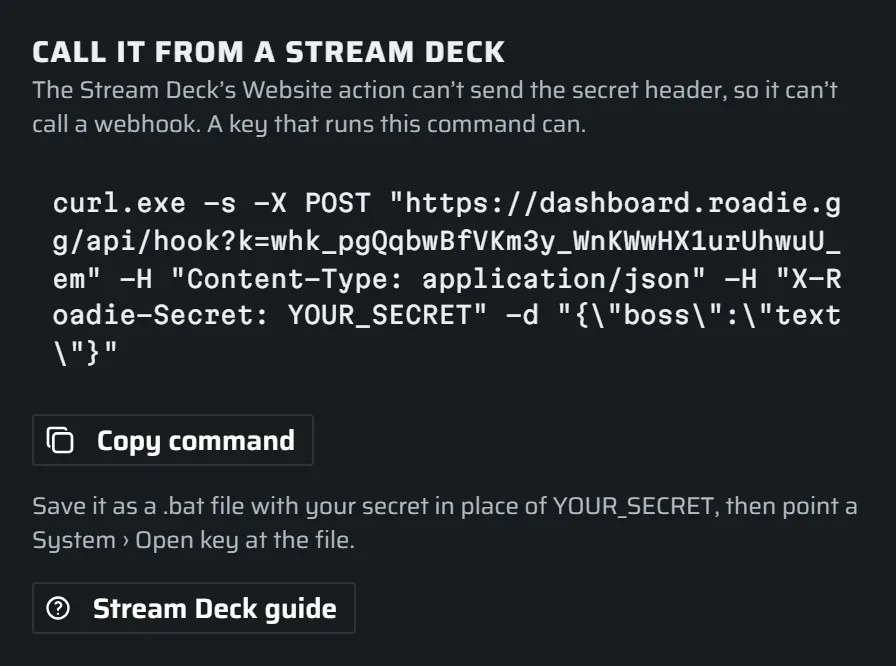
The command looks like this:
curl.exe -s -X POST "https://dashboard.roadie.gg/api/hook?k=whk_…" -H "Content-Type: application/json" -H "X-Roadie-Secret: YOUR_SECRET" -d "{\"boss\":\"text\"}"The part after -d is the webhook's fields. Change the sample values to what the key should send. For a key that sends nothing, use -d "{}". Each key that sends different values gets its own .bat file.
Or use a Stream Deck plugin
Plugins in the Elgato Marketplace that send web requests can call a webhook too, as long as they let you add a header. Search the Marketplace for "web request" or "API". Set the action up like this:
| Setting | Value |
|---|---|
| Method | POST |
| URL | the webhook's address |
| Header | X-Roadie-Secret set to your webhook secret |
| Body | the fields as JSON, such as {"boss":"Margit"}, or {} |
| Type | application/json |
Check it worked
Every call shows up in the webhook's request log, on its page in Roadie, for 7 days. Refused and rejected calls are in it too, with the reason:
- Done: it ran.
- Refused: the secret was wrong or missing, the webhook is switched off, or it was called too often or during its cooldown. A refused call's body is never read, so it shows a dash.
- Rejected: a required field was missing, or a field sent the wrong kind of value.
Keep the secret safe
The .bat file holds your secret in plain text, so keep it on your own PC and never share it or show it on stream. If it gets out, press Rotate. The old secret stops working at once for every webhook, so paste the new one into each .bat file and plugin.